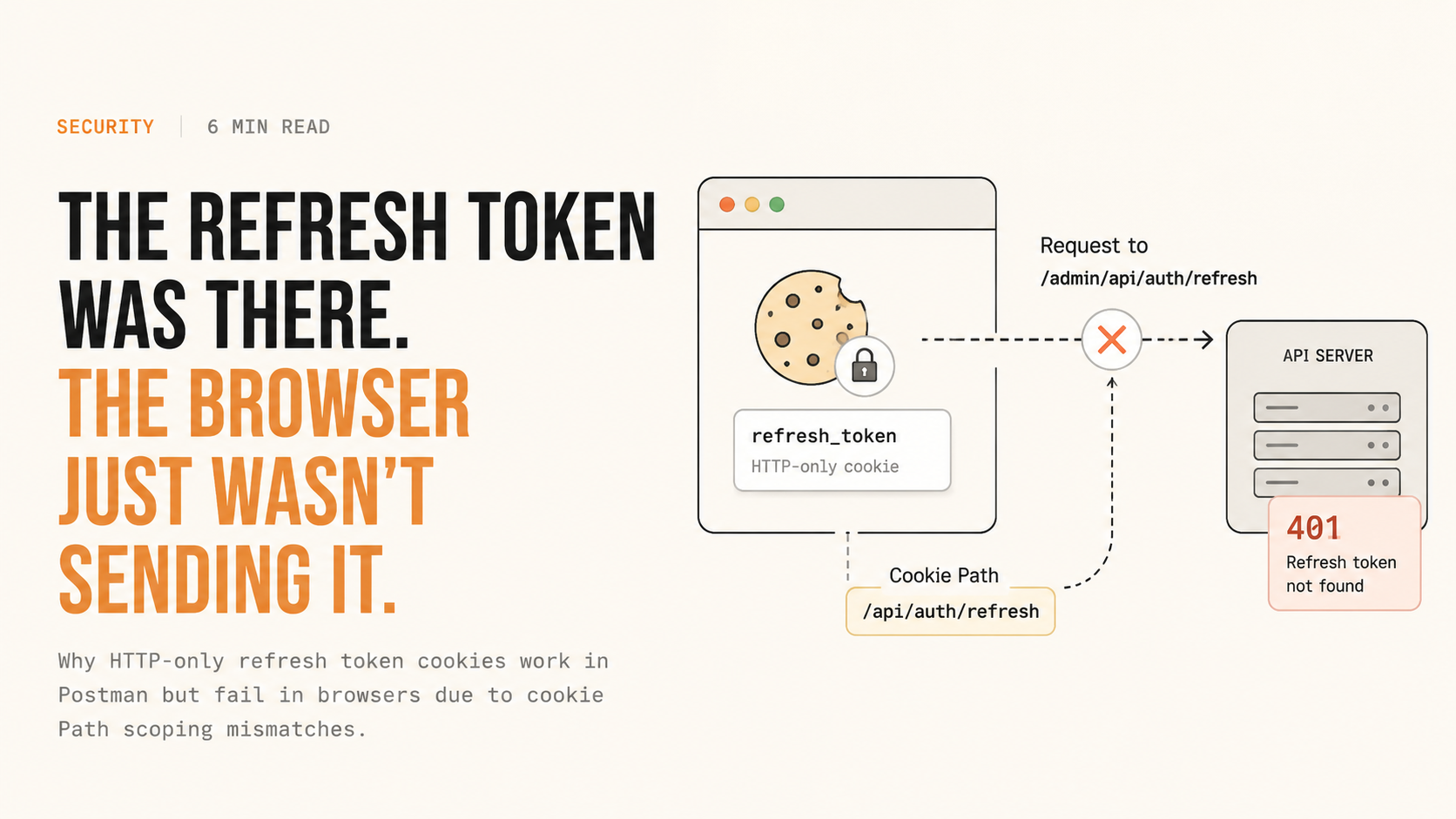
Sometimes an issue looks like an authentication problem, but the actual problem is somewhere completely different.
A few days back, while working on an authentication flow, I ran into a strange issue with refresh tokens.
The login API was working perfectly.
The access token was being generated.
The refresh token was also being generated.
It worked fine in Postman.
But when I tested the same flow from the browser, the refresh endpoint was returning:
401 Refresh token not foundMy first thought was obvious:
The refresh token isn’t being stored properly.
But that wasn’t the actual problem.
The authentication flow
After login, our application generates two JWTs:
Access token
Refresh token
Both are stored as HTTP-only cookies.
The access token is short-lived, while the refresh token has a longer lifetime and is used to generate a new access token when the current one expires.
The refresh cookie configuration looked something like this:
res.cookie("refreshToken", refreshToken, {
  httpOnly: true,
  secure: true,
  sameSite: "strict",
  path: "/api/auth/refresh",
  maxAge: 7 * 24 * 60 * 60 * 1000,
});
Nothing looked obviously wrong.
The interesting part was that the issue was happening only in the deployed environment.
Locally, everything was working.
So I started comparing the local and deployed environments.
The endpoint was different in production
Locally, the refresh endpoint was effectively:
/api/auth/refreshBut in the deployed environment, the application was running behind an additional route prefix, so the actual endpoint was:
/admin/api/auth/refreshThat’s when I started looking more closely at the cookie itself.
The cookie had:
Path=/api/auth/refreshBut the request was going to:
/admin/api/auth/refreshAt first, I thought the cookie simply wasn’t being stored.
So I checked the browser.
And this is where things got interesting.
The cookie was actually there.
Stored doesn’t mean sent
I opened the browser’s developer tools and checked the stored cookies.
The refresh token was present.
So the next step was to inspect the actual refresh request in the Network tab.
That’s where I found the real problem.
The refresh token existed in the browser’s cookie storage, but it wasn’t being included in the request.
This is an important distinction:
A cookie being stored doesn’t mean it will be sent with every request.
Before attaching cookies to a request, the browser evaluates their attributes, including the cookie’s Path.
In our case:
Cookie Path:
 /api/auth/refresh

Request Path:
 /admin/api/auth/refresh
The request path wasn’t within the cookie’s Path scope.
Therefore, the browser didn’t send the cookie.
From the backend’s perspective:
req.cookies.refreshToken;was:
undefinedSo the backend did exactly what it was supposed to do:
401 Refresh token not foundThe JWT wasn’t invalid.
The refresh endpoint wasn’t broken.
The cookie wasn’t missing.
The browser simply wasn’t sending it.
Why did Postman work?
This was another clue.
The exact same authentication flow worked from Postman.
That’s because Postman was sending the cookie with the request, while the browser was applying its cookie rules and refusing to attach a cookie whose Path didn’t cover the requested URL.
This is one of those cases where:
Postman works
Browser doesn't
doesn’t necessarily mean your API logic is wrong.
It can mean you’re dealing with browser-specific behavior around:
- Cookies
- Path
- Domain
- SameSite
- Secure
- CORS
- Credentials
In this particular case, the issue was specifically the cookie’s Path.
The fix
Once the problem was identified, we changed the cookie path so that it matched the deployed route structure.
For example:
res.cookie("refreshToken", refreshToken, {
  httpOnly: true,
  secure: true,
  sameSite: "strict",
  path: "/admin/api/auth/refresh",
  maxAge: 7 * 24 * 60 * 60 * 1000,
});
I also made sure that the logout logic used the same cookie path when clearing the refresh token.
This is important because clearing a cookie requires matching its relevant attributes, particularly its path.
After deploying the change, I tested the complete flow again.
Login worked.
The refresh cookie was stored.
The refresh request contained the cookie.
The backend received:
req.cookies.refreshToken;And the refresh endpoint returned successfully.
Don’t hardcode deployment-specific paths
There was another lesson here.
The same backend can be deployed under different route prefixes.
For example, one environment might expose:
/api/auth/refreshwhile another might expose:
/admin/api/auth/refreshIf the cookie configuration is hardcoded, this can easily become an environment-specific bug.
One approach is to make the cookie path configurable:
AUTH_REFRESH_COOKIE_PATH=/api/auth/refreshand then configure the deployed environment appropriately:
AUTH_REFRESH_COOKIE_PATH=/admin/api/auth/refreshThen:
res.cookie("refreshToken", refreshToken, {
  httpOnly: true,
  secure: true,
  sameSite: "strict",
  path: process.env.AUTH_REFRESH_COOKIE_PATH,
  maxAge: 7 * 24 * 60 * 60 * 1000,
});
Another option is:
path: "/";This makes the cookie available across paths on the host, which can be useful when deployment prefixes vary.
However, it also gives the cookie a broader scope.
For authentication cookies, I generally prefer using the narrowest path that fits the application’s architecture rather than unnecessarily making the refresh token available everywhere.
The debugging lesson
The biggest lesson for me wasn’t actually about cookie paths.
It was about how I approached the debugging.
Initially, I was asking:
“Why isn’t the refresh token being stored?”
That assumption sent me in the wrong direction.
The better question was:
“Is the browser actually sending the refresh token?”
That changed the debugging process completely.
Instead of only looking at the authentication code, I started inspecting the actual HTTP request.
The browser’s developer tools made the difference obvious:
Application / Storage
        ↓
Cookie exists
        ↓
Network tab
        ↓
Refresh request
        ↓
Cookie header missing
        ↓
Check cookie attributes
        ↓
Path mismatch
That is a much more reliable way to debug browser authentication issues.
A useful checklist
When a cookie-based authentication flow works in Postman but fails in the browser, don’t immediately assume the token is invalid or missing.
Check these in order:
- Does the cookie exist in browser storage?
- Is the cookie being included in the actual request?
- Does the cookie’s
Pathcover the request URL? - Is the
Domaincorrect? - Are
Secureand HTTPS configured correctly? - Is
SameSiteappropriate for the deployment architecture? - Are cross-origin requests configured with credentials when required?
- Is the frontend actually sending credentials, e.g.
credentials: "include"or the Axios equivalent? - Are proxies or gateways changing the application’s URL prefix?
- Does logout use the same cookie attributes when clearing the cookie?
The important part is to inspect the actual browser request, not just the application code.
Final takeaway
There are a lot of moving parts in authentication:
JWTs
Cookies
Domains
Paths
SameSite
CORS
HTTPS
Proxies
Deployment prefixes
And sometimes the bug isn’t in the authentication logic at all.
The token can be perfectly valid.
The cookie can exist.
The backend can be working correctly.
But the browser can still decide not to send that cookie.
In this case, what initially looked like a refresh-token problem turned out to be a one-line cookie configuration issue.
The refresh token was there.
The browser just wasn’t sending it.
And that was a good reminder that when debugging authentication, don’t just ask whether the credential exists.
Ask whether it actually made it to the server.
— Nikhil Gautam